

Introduction
Billit API gives you the ability to connect to your billit.io account, retrieve your clients and suppliers, check your invoice's status, see your balance and create OCP (One click payment) links. You can of course generate new invoices from any kind of application by using a set of callable API endpoints. To perform an action using the API, you need to send a request to its endpoint specifying a method and some arguments, and you will receive a formatted response.
In case you're a Greek company, invoices are also compatible with MYDATA and can be forwarded automatically to the authorities (A.A.D.E).
Sandbox
- Web app: https://app.sandbox-billit.xyz
- API endpoints: https://api.sandbox-billit.xyz
Production
- Web app: https://app.billit.io
- API endpoints: https://api.billit.io
The API has a limit of 60 requests/minute. If you hit that limit you get an error with status code 429 "Too Many Requests"
How to start
For your convinience, Billit provides you a Sandbox environment. This way you can test your API implementation and watch the end result at all times in your web app space. The steps you must take in order to use the API is as follow:
-
You need to register first in order to have a sandbox account.
-
After logging in to your app section of your Sandbox account, you need to navigate to settings > API (tab) and generate a token
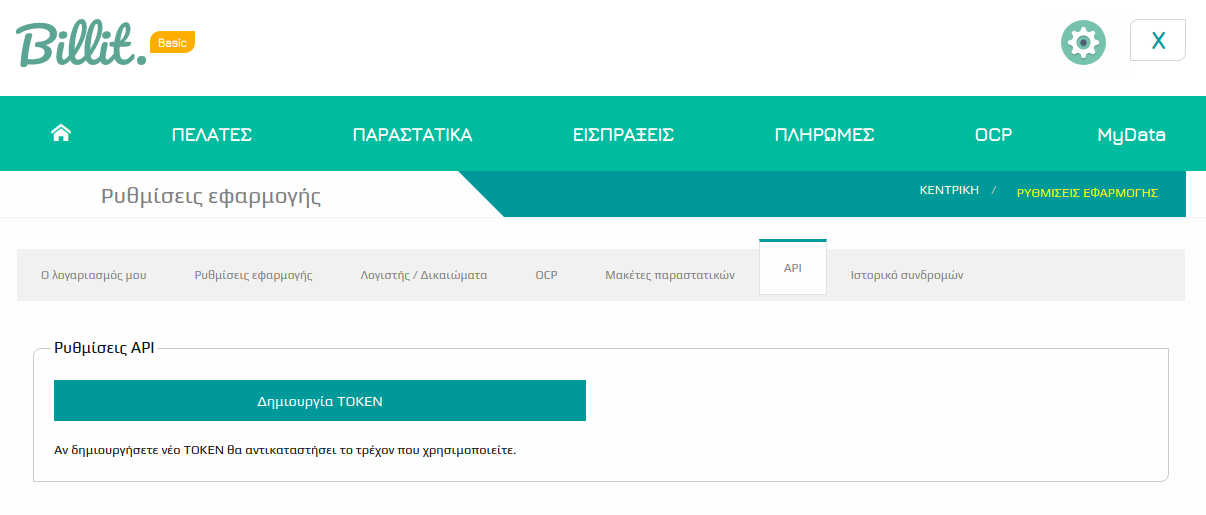
Use that generated token to your requests by hitting the sandbox endpoints. If you want to check the UI after your API request, visit the Sandbox web app url as well.
In case you use PHP, we provide an opensource package you can use to make things very easy. Special addons included if you use the Laravel Framework
Make sure to test your implementation thoroughly using the Sandbox account first. When you're ready for production we will give you full write access to all resources the same day.
Authentication
This API uses a Bearer Token for authentication, To Generate a token follow the instructions as seen in the "How to start" section of this documentation.
Example Header
Code
If you want to test your credentials just make a POST request with the Authorization Header to https://api.sandbox-billit.xyz/v1 and you will receive a 200OK response with the following json body
{'msg' : 'Hello from the Billit API'}
The "Try it out" feature
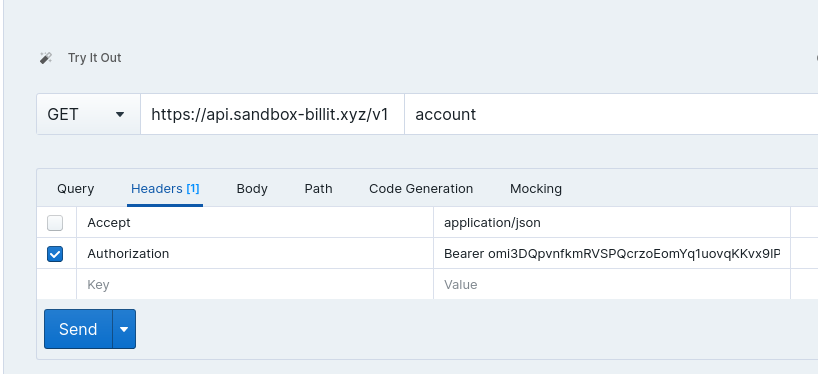
The API documentation includes an HTTP client that you can use to make realy quickly requests and see the responses. To use the Authentication, send an "Authorization" header with value of your token with an appended "Bearer" string, like this:
Using the "My Account" endpoint
The /account endpoint response is important. The reason is that except the expected information regarding the user, the setup and subscription details it also contains the account's Vat details, Payment methods and Biller information. This information doesn't change often so you can safely cache it as long as you need or even hard code the Ids from those objects when you need them to your requests.
As an example, if you'll use the /invoice endpoint to create a new invoice, you will definitely need the billerId, paymentmethodId and the vatId (for each product row). This kind of information lives in the /account endpoint response, no need to make extra queries to other endpoints just to fetch those.
Pagination
This API uses pagination when retrieves a lot of results. The default (per page ) but you can choose anything you want by sending a parameter of "per_page" with an INT.
- Default is 25
- Max is 250
HTTP Methods
This API uses HTTP verbs (methods) as following:
GET- Read - used to read (or retrieve) a representation of a resource,POST- Create - used to create new resources. In particular, it's used to create subordinate resources.PUT- Update/Replace - used for update capabilities, PUT-ing to a known resource URI with the request body containing the newly-updated representation of the original resource. On successful request, replaces identified resource with the request body.DELETE- Delete - used to delete a resource identified by a URI.
Media Type
Where applicable this API MUST use the JSON media-type. Requests with a message-body are using plain JSON to set or update resource states.
Content-type: application/json and Accept: application/json headers SHOULD be set on all requests if not stated otherwise.
Representation of Date and Time
All exchange of date and time-related data MUST be done according to ISO 8601 standard and stored in UTC.
When you send a date as input to create a new resource or to filter results, you need to send it formatted as "Y-m-d" ( Year - Month - day Ex: 2021-05-28).
Status Codes and Errors
This API uses HTTP status codes to communicate with the API consumer.
200 OK- Response to a successful GET, PUT, PATCH or DELETE.201 Created- Response to a POST that results in a creation.204 No Content- Response to a successful request that won't be returning a body (like a DELETE request).400 Bad Request- Malformed request; form validation errors.401 Unauthorized- When no or invalid authentication details are provided.403 Forbidden- When authentication succeeded but authenticated user doesn't have access to the resource.404 Not Found- When a non-existent resource is requested.405 Method Not Allowed- Method not allowed.406 Not Acceptable- Could not satisfy the request Accept header.415 Unsupported Media Type- Unsupported media type in request.422 Validation error- You should check your input again.
Error response
This API returns both, machine-readable error codes and human-readable error messages in response body when an error is encountered.
Examples
Resource not found
Code
Validation Error
Code
Generic Error
Code