WooCommerce + Billit Integration Free plugin
Every WooCommerce order
becomes a myDATA document
Billit’s WordPress plugin sends every order to Billit. The right receipt or invoice is issued and goes to AADE.
No retyping, no second system.
In short
- 1. Install the free “Billit Invoicing for myDATA” plugin from WordPress.org and click “Σύνδεση με Billit” (Connect with Billit). No keys to copy.
- 2. When an order reaches the status you choose (e.g. Completed), Billit issues a receipt or invoice and sends it to myDATA.
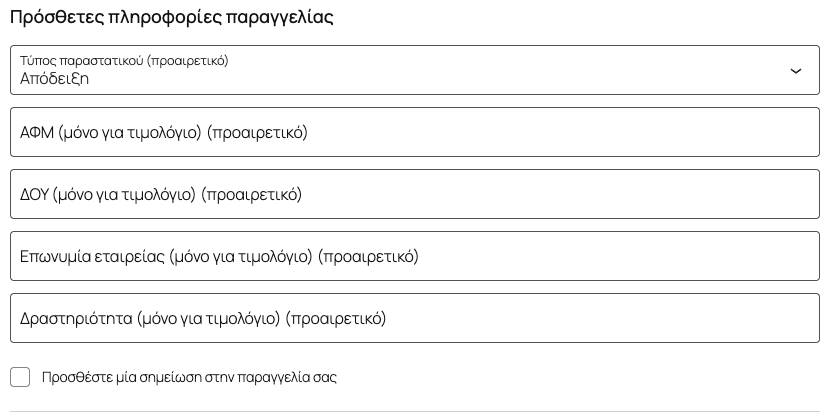
- 3. The customer chooses a receipt or an invoice at checkout. For an invoice they type the VAT number and the other details fill in by themselves.
- 4. The MARK and the document link show up on the WooCommerce order.
- 5. If the amount doesn’t add up, the document stays a draft in Billit and you get an email. No order is lost.
You sell, Billit invoices
Automation, simple and clear.
-
Receipt or invoice
The customer chooses at checkout. Billit issues the matching document, without you changing anything by hand.
-
Details from the VAT number
The customer types the VAT number and the tax office, company name and activity fill in automatically from the AADE registry. You only need your GSIS credentials in Billit.
-
The MARK on the order
On the order screen you see the MARK and the document link. In the orders list, a column shows the status of each one.
-
Product sync
Every time you save a product in WooCommerce, it is updated in Billit too. Existing products go over all at once with one button.
-
Cash on delivery
The cash on delivery fee goes on a separate line of the document, using the item you set once in Billit’s settings.
-
No developer needed
Click “Σύνδεση με Billit” (Connect with Billit), approve from your account and you are back, connected. No API keys, no code.
A checkout that asks for the right details
The plugin adds the fields a Greek invoice needs to the checkout. It works in both the block and the classic checkout.
- Receipt or invoice: the customer’s choice decides the document.
- VAT number, tax office, company name, activity: the invoice fields. Without a valid VAT number and company name, an invoice order can’t be placed.
- Autofill: from the VAT number, the company details come from the AADE registry (GSIS), using your own GSIS credentials.
- Never holds up the order: if the lookup is slow or fails, the customer checks out as normal.
How does it work?
From the WooCommerce order to AADE’s MARK
-
01
WooCommerce
The order reaches the status you chose
-
02

Billit
Issues a receipt or invoice
- Receipt or invoice, as the customer chose
- Amount check
-
03
myDATA (AADE)
Through a certified provider
MARK / QR code received
-
04
Order
MARK & document link
on the order screen
If the network drops, the plugin retries by itself.
If an order doesn’t reach Billit, the plugin sends it again after 1 minute, 5 minutes, 30 minutes, 2 hours and 12 hours.
If needed, a “Retry” button appears on the order.
The MARK inside WooCommerce
No need to open Billit to check whether the document was issued.
You see it in your orders.
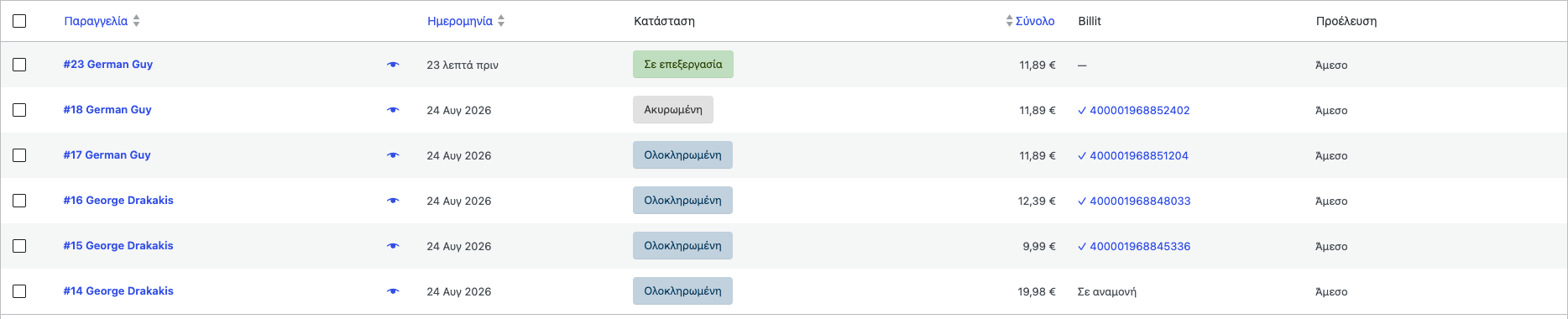
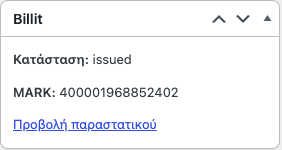
Optionally, the document link is also added to the order email your customer receives.
See all screenshots on WordPress.org ↗How do you get started?
Three steps from installing to your first automatic order
-
1
Install
Install Billit Invoicing for myDATA from WordPress Plugins and activate it.
-
2
Connect
In WooCommerce › Settings › Billit click “Σύνδεση με Billit” (Connect with Billit) and approve. No account yet? Create one right there.
-
3
Check the setup
The Billit setup status card shows what is missing. Each open item links to the Billit page that fixes it.
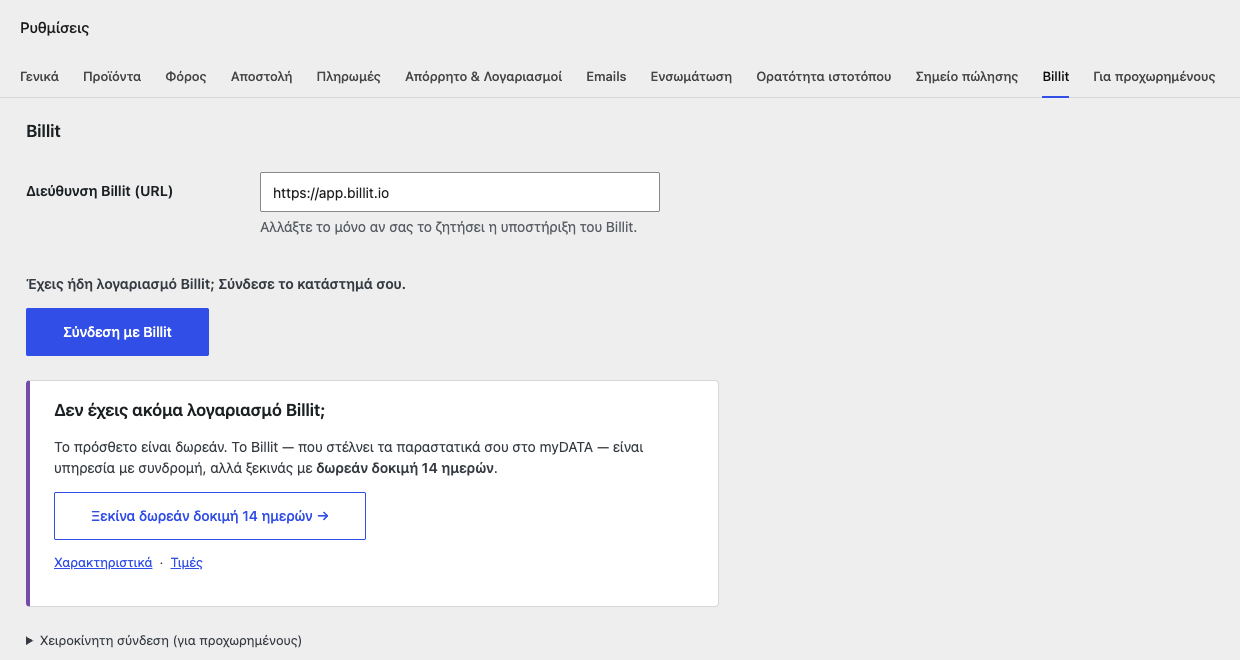
What the status card checks
- An active myDATA channel
- Document types for receipts and invoices
- GSIS credentials for VAT number autofill
- Default myDATA classifications
- OSS for sales to consumers in the EU (optional)
Test mode
While you set up the store, documents are created but not transmitted. You see how they come out before you switch on myDATA.
No order gets lost
Billit would rather ask you than send something wrong to AADE.
When a document stays a draft
- The amount doesn’t add up. If the WooCommerce total differs from what Billit calculates, we stop.
- There is a charge with no Billit item. For example, a cash on delivery fee with no item set in the settings.
You get an email with a link to the draft. You fix it in Billit and finalise it. The customer receives nothing until then.
You see it in WooCommerce too
In the orders list, the Billit column shows
Πρόχειρο — χρειάζεται έλεγχο (draft, needs review)
with a link to the document. Once you finalise it in Billit, the order updates with the MARK by itself.
Technical requirements
- WordPress 6.4 or newer
- WooCommerce 8.9 or newer
- PHP 8.1 or newer
- A Billit account (you create it while connecting)
Order data goes only to Billit. No other outside service.
What isn’t covered
Better to know up front:
- Past orders. The plugin covers orders from the moment you connect onwards.
- Cancellations and refunds. You issue the credit note from your Billit account.
- Showing fields on demand in the block checkout. In the first version, the invoice fields are always visible.
Introductory offer · new customers only
Half price on the yearly Billit PRO plan
-50% half price
For the plugin’s first new customers: install it on your store, get in touch with us and the yearly PRO plan costs half.
Yearly PRO plan
€119.40 /year
€238.80 · excl. VAT
How to get it
- 1 Install the plugin from WordPress.org
- 2 Connect your store to Billit
- 3 Get in touch with us by 15/12
New Billit customers only. The discount applies to the Billit subscription, not to the certified provider’s cost.
COST
What do you need?
The plugin is free. You need a Billit PRO plan and, for most businesses, a certified e-invoicing provider
Billit PRO
Invoicing subscription
€19.90 /month
- WooCommerce plugin (free)
- Unlimited receipts and invoices
- Company details from the VAT number
- Email support
14 days free
No credit card
Certified provider
Partner provider
myDATA provider
Prepaid credits
Separate contract with the provider
- Transmission to AADE’s myDATA
- MARK/QR code received
- B2G documents (PEPPOL)
- Full legal coverage
How it works:
- 1 You sign a contract with our partner provider
- 2 You receive credentials
- 3 You enter them in Billit
Note
In some cases (exemptions) a contract with the provider may not be needed. Ask your accountant.
Get started today.
Free for 14 days.
- No credit card
- No commitment
- Cancel any time
Frequently asked questions
What WooCommerce merchants usually ask.
How do I connect my store?
In the plugin settings, click “Σύνδεση με Billit” (Connect with Billit) and approve from your account. Nothing is copied by hand. If your site can’t be reached by Billit (e.g. local development or basic auth), there is a manual token connection on the same page.
Is cash on delivery supported?
Yes. The cash on delivery fee goes on a separate line of the document. You set once in Billit’s settings which item to use; if none is set, the document stays a draft for you to review. For a cancellation or refund, you issue the credit note from your Billit account.
Does it work with the new block checkout?
Yes. The VAT number, tax office, company name and activity fields work in both the block and the classic checkout. In the first version, the block checkout always shows these fields, whether the customer chose a receipt or an invoice.
What about my past orders?
The plugin doesn’t import past orders. It covers orders from the moment you connect onwards.
Can I try it without sending anything to AADE?
Yes. In test mode, documents are created in Billit but not transmitted to myDATA. When you are ready, you switch on myDATA.
Do I need a provider? What does it cost?
Your accountant will tell you what your obligation is, depending on what your business does. Some exceptions don’t need a provider, so it matters that your accountant is well informed. The provider’s cost depends on the number and type of documents. Provider prices change often, so get in touch and we will give you an idea.
I already have a provider. Do I need to switch?
Not necessarily. In Billit you can add a provider or replace the one you have, and you can have more than one provider.
Every WooCommerce order,
automatically in myDATA
Install the plugin, connect Billit
and let invoicing take care of itself.
No credit card • Cancel anytime